
VIPER | Migration Guide
ACV VIPER's dashboard and mobile app are moving into ACV MAX
Starting October 20th, the current VIPER inspection dashboard and VIPER mobile app will be retired. All your existing inspections are carrying over, so nothing is lost in the move.
Log in to ACV MAX -- Download for iOS -- Download for Android
What's changed
We've moved the tools for managing VIPER inspections into ACV MAX. Your VIPER still works the exact same way - but now you can see all your VIPER inspections and your ACV MAX appraisals in a single place.
- Already use ACV MAX? One system, one login. Your VIPER inspections now sit right alongside the inventory and appraisals you already manage in ACV MAX, so you no longer need to switch between apps or keep track of separate logins.
- New to ACV MAX? Appraisals now included. The ACV MAX Appraisal tool now comes with your VIPER subscription at no additional cost, giving you a host of new features to appraise and acquire even more vehicles.
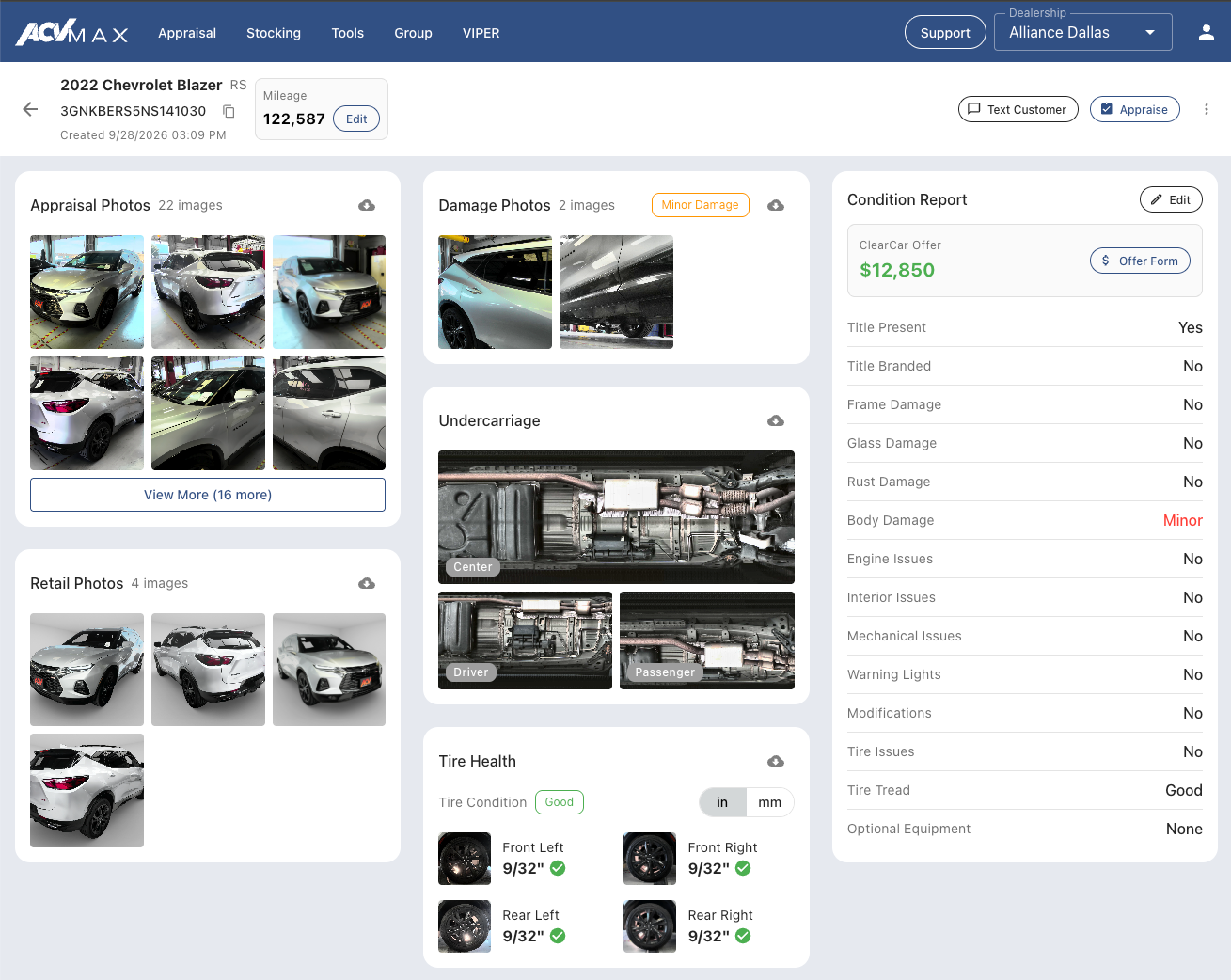
Whats new in VIPER
- A redesigned, easier-to-read inspection report: We've redesigned the VIPER inspection report page so you can take in a vehicle at a glance. Photos, damage findings, tire health, the Condition Report, and the ClearCar Offer are laid out clearly on one page, so your team spends less time hunting for details and more time talking to the customer.
- Identify repeat inspections: Vehicles that have driven through VIPER more than once now show a scan count and the time of their most recent scan. A car that keeps coming back to your service lane is easy to find and worth a conversation about acquiring it.
- Download VIPER photos: You can now download VIPER photos directly from the new inspection report page. Use retail-ready shots for online listings the moment a car goes into inventory, share damage photos with a customer, or save them for your records.
- Inspect with VIPER then Appraise in MAX: Click Appraise from the VIPER Inspections list or from the Inspection Report page to create a new appraisal from any VIPER inspection, and see ACV MAX Retail, ACV Wholesale, and ACV Guarantee values side by side.
Getting started
If you're already an ACV MAX dealer
Nothing changes about how you log in.
- Log in to ACV MAX
- Click VIPER in the top navigation to access the new VIPER experience
If you're not yet on ACV MAX
You'll get everything you need by email on the morning of October 20th.
- Check your email for your new username
- Go to my.max.auto and click "Forgot password"
- Check your email again and follow the instructions to set a new password
- Once you've logged into ACV MAX, click VIPER in the top navigation to access the new VIPER experience
VIPER on mobile
You can also manage your VIPER inspections in the ACV MAX mobile app.
- Download (or update) the mobile app for iOS or Android
- Go to my.max.auto and click "Forgot password"
- Check your email again and follow the instructions to set a new password
- Once you've logged into ACV MAX, click VIPER in the top navigation to access the new VIPER experience
Questions? We're here to help
Contact ACV MAX Support at 877-378-5665 or email helpdesk@acvmax.com.